Laptop Recycling for Companies: The Complete Business Guide
“Laptop recycling for companies is the structured process of collecting, data-wiping, auditing, and responsibly disposing of or repurposing end-of-life business laptops. It must comply with WEEE Regulations, GDPR data destruction requirements, and environmental legislation. Done correctly, it protects company data, avoids regulatory fines, and reduces electronic waste going to landfill.”
I've spoken to enough business owners and IT managers to know that laptop disposal still doesn't get the attention it deserves.
Old devices get stacked in storage rooms. They get handed to staff as parting gifts with no data wipe. They get dropped at charity shops with company files still sitting on the hard drive. Sometimes they get thrown in general waste — which is illegal in the UK, but it happens more than anyone likes to admit.
None of this happens because companies are negligent. It happens because corporate laptop recycling sits in an uncomfortable gap between IT, compliance, HR, and operations — and whoever owns it at any given moment usually doesn't own all of it.
The result is a process that's inconsistent at best and legally exposed at worst.
This guide is the resource I wish existed the first time I had to navigate this for a business. It covers the full scope — data destruction, WEEE compliance, GDPR obligations, environmental duties, and a practical step-by-step process that any company can implement regardless of size.
If you manage IT equipment for a business in Scotland and you're not confident your current disposal process is fully compliant, keep reading. This matters more than most IT guides suggest.
What Laptop Recycling for Companies Actually Involves
Let's get the definition right first.
Laptop recycling for companies is not simply dropping old hardware at a recycling point. For businesses, it is a multi-stage, compliance-driven process that covers four distinct obligations simultaneously.
Data security — ensuring that all company data, personal data, and customer data stored on a device is destroyed beyond recovery before the device leaves company control.
Legal compliance — meeting the requirements of the Waste Electrical and Electronic Equipment (WEEE) Regulations, which make businesses legally responsible for the appropriate disposal of electronic equipment.
GDPR compliance — meeting the data protection obligations under UK GDPR, which require documented, verifiable data destruction for any devices that have processed personal data.
Environmental responsibility — ensuring devices are processed by authorised recyclers who recover materials appropriately rather than sending hazardous components to landfill.
All four of these obligations apply simultaneously. A company that handles the environmental side correctly but skips data destruction has failed. A company that wipes data but uses an unregistered disposal company has violated WEEE Regulations. The process only works when all four elements are addressed together.
That's the starting point. And it's why most generic "how to recycle your old laptop" guides are not adequate for businesses.
Why Companies Get This Wrong — and the Consequences
There are three recurring mistakes I see businesses make with laptop disposal.
Mistake 1: Treating it as an IT task rather than a compliance task. When laptop disposal is handed to IT, the focus tends to be on logistics — clearing space, removing devices from asset registers, and moving on. Data destruction may or may not happen, and documentation almost certainly doesn't. That's a GDPR exposure waiting to happen.
Mistake 2: Assuming factory reset equals data destruction. This is perhaps the most dangerous misconception in corporate IT disposal. A factory reset restores a device to default settings. It does not securely erase data. With the right software tools, data from a factory-reset device can be recovered in its entirety. For SSDs specifically — which are now the standard in most business laptops — the situation is even more technically complex, as I explain in data destruction for SSDs.
Mistake 3: Using unregistered disposal providers. Businesses are required under WEEE Regulations to use authorised treatment facilities for electronic equipment. Using an unregistered collector — even one that appears legitimate — makes the business legally liable for improper disposal. The cheapest quote is not always the safest one.
The consequences of getting this wrong range from significant. ICO enforcement actions for data breaches through inadequate device disposal have resulted in fines under UK GDPR. WEEE violations carry their own penalty structure. And reputational damage — if customer or employee data is found on a disposed device — is hard to quantify and harder to recover from.
This is not a theoretical risk. It's a documented one.
The Legal Framework Every Company Needs to Understand
Before building any process, it's worth being clear about what the law actually requires. There are three pieces of legislation that intersect in corporate laptop recycling.
The WEEE Regulations 2013 (as amended)
The Waste Electrical and Electronic Equipment Regulations place legal responsibility on businesses for the appropriate disposal of electronic equipment. Under business-to-business WEEE rules, companies must ensure that any IT equipment they dispose of goes to an authorised treatment facility — not general waste, not unregistered collectors, not charity shops that don't have appropriate waste handling authorisation.
Businesses that sell or transfer old equipment to another user can sometimes offset this responsibility — but only if the equipment goes to a registered facility at the end of its useful life. The paperwork trail matters.
UK GDPR and the Data Protection Act 2018
Under UK GDPR, any device that has been used to process, store, or transmit personal data must have that data destroyed in a verifiable way before disposal. This includes customer records, employee files, email data, CRM information, and anything else that constitutes personal data under the definition in the Act.
Critically, UK GDPR requires documentation. A verbal assurance from a recycling company that "data has been wiped" is not sufficient. You need a data destruction certificate that specifies the method used, the devices processed, the date, and the name of the authorised provider.
I've covered the full scope of what this means for businesses in GDPR data destruction explained — if you're unsure what your specific data destruction obligations are, that post covers the legal requirements in plain language.
The Environmental Protection Act 1990
Beyond WEEE, the Environmental Protection Act creates a duty of care for businesses in how they handle waste materials. Electronic equipment contains hazardous components — lead, mercury, cadmium, brominated flame retardants — that cannot legally go to general waste streams. Businesses that knowingly or unknowingly allow this to happen carry legal liability.
Understanding where these three pieces of legislation overlap is essential for building a compliant corporate laptop recycling process. The good news is that a properly structured approach satisfies all three simultaneously.
The CLEAR Process: A Five-Step Framework for Corporate Laptop Recycling
After mapping the compliance requirements and working through what a complete process looks like in practice, I've structured it into a five-step framework. I call it the CLEAR Process.
C — Collect and catalogue L — Log and label E — Erase data securely A — Audit and certify R — Recycle or repurpose responsibly
Here's how each step works.
Step 1 — C: Collect and Catalogue
The process begins before a single laptop is touched. Every device earmarked for disposal needs to be collected centrally and catalogued before anything else happens.
Cataloguing means recording the make, model, serial number, asset tag, and current user assignment for every device. This is your audit trail — the document that proves your company maintained proper control of every device from the point it left active use to the point it was destroyed or recycled.
For larger organisations running regular device refresh cycles, this catalogue should be maintained as a live asset register that's updated continuously. For smaller businesses doing a one-time clear-out, this can be done as a standalone exercise before disposal begins.
Don't skip this step because it feels administrative. If a data breach investigation ever involves a disposed device, the audit trail you create here is your evidence that the device was handled correctly.
Step 2 — L: Log and Label
Once devices are catalogued, each one needs to be physically labelled with its disposal reference number and logged into a disposal workflow. This creates the chain of custody — the documented record of where each device was at every stage of the process.
For businesses handling their own initial collection before handover to a recycling provider, this means maintaining a signed-off record at each transfer point. When devices move from department to IT, that transfer should be logged. When devices move from IT storage to the recycling provider, that transfer should be logged and co-signed.
Chain of custody documentation is the element most often missing from small business disposal processes — and it's the element that matters most in a compliance audit. If you're a smaller operation looking for guidance on what this documentation should include, the small business IT recycling guide covers the practical requirements at a scale that's manageable without a dedicated IT team.
Step 3 — E: Erase Data Securely
This is the most technically critical step, and it's the one where most companies' processes fall short.
Secure data erasure for business laptops is not factory reset. It is not reformatting the drive. It is not simply deleting files and emptying the recycle bin. For a business laptop that has processed personal data, secure erasure means one of three things:
Software-based overwriting — using certified data erasure software (such as Blancco or Ontrack Eraser) to overwrite every sector of the storage device with random data, verified to standards like NIST 800-88 or DoD 5220.22-M. This is appropriate for HDDs and some SSDs where the erasure can be verified at the sector level.
Cryptographic erasure — for SSDs with hardware encryption, cryptographic erasure involves destroying the encryption key, rendering all data on the device permanently unreadable without requiring sector-by-sector overwriting. This is the preferred method for self-encrypting drives.
Physical destruction — for devices where software erasure cannot be verified, or where the sensitivity of the data requires the highest possible assurance level, physical destruction of the storage media is the appropriate approach. This typically means shredding or degaussing the drive.
The choice between these methods depends on the type of storage media, the sensitivity of the data, and the intended fate of the device after erasure. A device being resold or donated needs to have its data erased but the hardware intact. A device going to physical recycling can have its storage media destroyed.
For a detailed breakdown of why SSD data destruction requires specific approaches that differ from traditional HDD erasure, data destruction for SSDs covers the technical specifics that most generic guides miss entirely.
Step 4 — A: Audit and Certify
Once data has been erased or the device has been prepared for physical destruction, you need documentation that proves it.
A data destruction certificate should include: the name and registration details of the provider who carried out the erasure, the specific method used, the standard the erasure was verified against, the make, model, and serial number of each device processed, and the date of destruction.
This certificate is your GDPR compliance record. Keep it. Store it alongside your other data protection documentation. If you ever face an ICO enquiry or a data subject access request that touches on a disposed device, this certificate is your evidence of compliance.
The audit step also includes confirming that devices are removed from your asset register at this point — not before, and not after. An asset register that still lists disposed devices creates liability. One that removes devices before destruction documentation is complete creates a different kind of gap. The timing matters.
To understand what happens to your data after certified destruction — including the full chain of what "destroyed" actually means in practice — what happens after data is destroyed explains the post-destruction process in detail.
Step 5 — R: Recycle or Repurpose Responsibly
The final step is where the actual environmental dimension of laptop recycling takes effect.
Once data has been securely erased and certified, a device can take one of three paths: refurbishment and resale through an authorised channel, donation to an eligible organisation with appropriate data destruction certification, or physical recycling through an authorised treatment facility.
For businesses in Scotland, the recycling provider you choose must be registered with the Environment Agency (or SEPA in Scotland) as an authorised waste carrier and should operate an approved treatment facility for WEEE. Always ask for their waste carrier registration number and verify it before engaging their services.
The most important thing to confirm is that your recycling provider issues a waste transfer note for every collection. This is the legal document that confirms your devices have been accepted by an authorised carrier — it's your proof of WEEE compliance and it completes the audit trail you started in Step 1.
For businesses in Glasgow and the surrounding area, IT recycling in Glasgow covers the specific service options and what to look for when choosing a local provider.
Case Study: A 47-Device Laptop Refresh at a Scottish Business
Let me walk through a realistic example of how the CLEAR Process works at scale.
A professional services firm with four offices across Scotland undertook a planned technology refresh, replacing 47 laptops across the organisation. Most of the outgoing devices were between four and six years old — a mix of SSDs and HDDs. All had been used by staff to access client data, internal financial records, and HR documents.
Before implementing a structured process, the firm's approach had been to factory-reset devices and place them in storage. Several had been taken by departing staff without any formal transfer or data erasure record. Two had been donated to a local school with no documented data destruction.
The CLEAR Process was applied to the remaining 39 devices. Here's what happened at each stage.
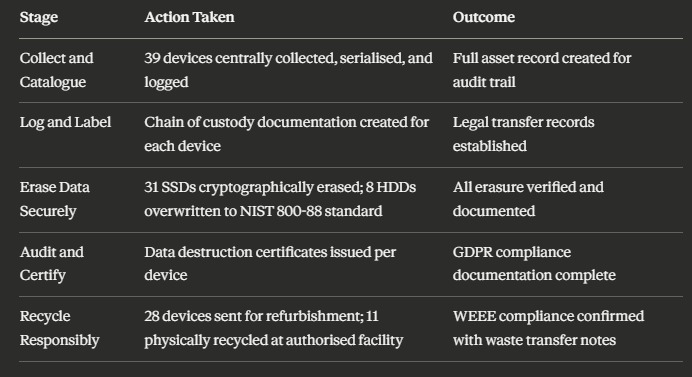
The result: Full documented compliance for 39 devices. The firm also voluntarily reported the eight undocumented prior disposals to their Data Protection Officer and conducted a risk assessment — finding no evidence of data exposure, but creating a formal record of the incident and the corrective action taken.
The two donated school laptops were traced, the school was contacted, and both devices were collected and formally processed retroactively. Neither device had been accessed by students during the gap period.
This kind of situation — where partial compliance existed but documentation was missing — is far more common than complete non-compliance. The CLEAR Process is specifically designed to make compliance the default, not the exception.
Laptop Recycling Options for Companies: A Comparison
Not every business needs the same recycling approach. Here's a structured comparison of the main options available to companies, with the compliance implications of each.
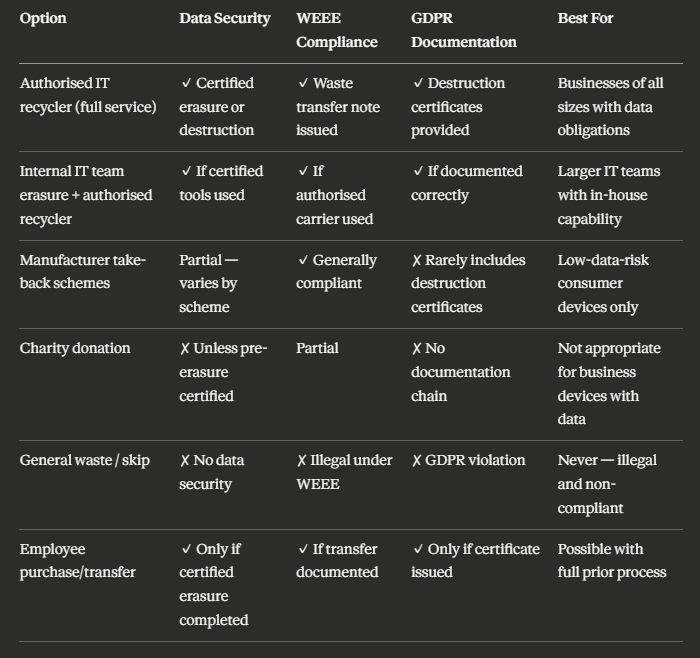
The table makes clear what the data consistently shows: for any business laptop that has processed personal data, a full-service authorised IT recycler is the safest and most compliance-secure option. It removes the risk of process gaps that internal handling can create, and it provides the documentation trail that GDPR requires.
For a more detailed breakdown of the difference between IT recycling and IT disposal — and why those two terms describe meaningfully different processes with different compliance implications — IT recycling vs IT disposal in Scotland covers the distinction in full.
Statistics Worth Knowing
Three data points that frame the scale and risk of this issue:
According to the Global E-Waste Monitor, the UK generated 23.9 kg of electronic waste per person in 2022 — among the highest per-capita rates in the world — with a significant proportion generated by businesses replacing IT equipment on regular refresh cycles.
A 2022 study by Blancco Technology Group found that 15% of second-hand IT devices purchased in the UK still contained residual data from previous owners, including complete documents, login credentials, and personal records — the direct result of inadequate enterprise disposal processes.
The Information Commissioner's Office reported that data security incidents related to hardware disposal and loss accounted for a consistent proportion of self-reported breaches in the financial services and professional services sectors — industries where corporate laptop use is highest.
GDPR and Corporate Laptop Recycling: What Compliance Actually Looks Like
I want to be specific here because this is where the most significant legal exposure sits for businesses.
UK GDPR applies to any device that has stored, transmitted, or processed personal data. For a business laptop, this almost always means it falls within scope — email accounts alone are typically sufficient to trigger the obligation.
Under Article 5(1)(f) of UK GDPR, personal data must be processed in a manner that ensures appropriate security, including protection against unauthorised or unlawful processing and against accidental loss, destruction, or damage. When you dispose of a laptop without certifiable data destruction, you are creating a point of potential unauthorised access to personal data. That is a compliance failure under Article 5.
Under Article 5(2) — the accountability principle — your organisation must be able to demonstrate compliance. That demonstration requires documentation. A data destruction certificate is that documentation.
For businesses operating across regulated sectors — healthcare, legal services, financial services — the obligations are more specific still. If you're responsible for IT equipment in a healthcare setting, IT recycling for healthcare covers the additional requirements that apply to devices that have processed patient data under NHS and CQC frameworks.
The full GDPR compliance picture for Scottish businesses — including what documentation to maintain, how long to keep it, and how to respond if a disposed device is later identified as a breach risk — is covered in IT recycling and GDPR compliance in Scotland.
What to Look for in a Laptop Recycling Provider
Not all recycling providers are equal. For businesses, the selection criteria go well beyond price per unit.
SEPA/Environment Agency registration — any provider operating in Scotland must be registered as an authorised waste carrier with SEPA. Ask for their registration number and check it independently. An unregistered carrier means your WEEE compliance is void regardless of what paperwork they provide.
Approved Treatment Facility status — the facility where devices are physically processed must be an approved treatment facility (ATF) under WEEE Regulations. This is separate from waste carrier registration. Ask explicitly whether the provider operates an ATF or subcontracts treatment to one — and get the name of the ATF in writing.
Data destruction certification standard — ask which erasure standard they work to (NIST 800-88, HMG Infosec Standard 5, or equivalent), and whether certificates are issued per device or per batch. Per-device certificates are significantly better for GDPR documentation purposes.
Waste transfer note provision — this is non-negotiable. Every collection of business IT equipment should result in a waste transfer note. If a provider doesn't issue these routinely, move on.
Insurance and liability — check that the provider carries appropriate liability insurance for the data destruction services they provide. In the event of a breach linked to their handling of your devices, you need to know where liability sits contractually.
For a full comparison of what IT recycling actually involves versus what simple e-waste disposal means — and why the distinction matters for data-carrying business devices — IT recycling vs e-waste disposal in Scotland is worth reading before you engage any provider.
Who This Guide Is For — and Who It Isn't
This guide is directly relevant for IT managers, office managers, and business owners in companies of any size that replace IT equipment as part of regular operations. It's particularly useful for organisations in regulated sectors — healthcare, legal, financial services, education — where data handling obligations are more specific and enforcement scrutiny is higher.
It's also relevant for companies undertaking a one-time technology refresh — moving to new hardware across an office, closing a site, or managing equipment from a company acquisition or merger.
This guide is not aimed at individuals recycling a personal laptop or households with a few old devices to dispose of. Consumer laptop recycling has a different regulatory context. If you're looking at recycling IT equipment across an organisation of any kind — even a small team of five — the business obligations described here apply to you.
If you're a smaller business unsure where to start, I'd recommend reading the small business IT recycling guide alongside this post. It addresses the same compliance obligations but with the specific context of businesses that don't have a dedicated IT team to manage the process.
The Environmental Case for Corporate Laptop Recycling
The compliance argument for proper laptop recycling is strong. But the environmental argument deserves its own section, because it's more substantial than most people realise.
A single laptop contains over 60 different materials — including aluminium, copper, cobalt, lithium, and rare earth elements. When these materials are properly recovered through authorised recycling, they re-enter the supply chain for new device manufacturing. When they go to landfill or informal processing, they're lost — and often release toxic compounds into soil and groundwater in the process.
For businesses with corporate sustainability commitments, ESG reporting, or supply chain transparency obligations, how you handle end-of-life IT equipment is increasingly a visible metric. Stakeholders, investors, and procurement managers in larger organisations are beginning to ask about IT disposal practices as part of broader supply chain due diligence.
Getting this right isn't just about avoiding regulatory penalties. It's about operating at the standard that responsible business requires.
The step-by-step mechanics of what actually happens to a laptop inside an authorised recycling facility — from intake to material recovery — is documented in how IT recycling works step by step. It's a useful read for anyone who needs to explain the process to senior leadership or include it in an ESG or sustainability report.
Common Questions Businesses Ask Before Starting
Before committing to a corporate laptop recycling process, most businesses have a handful of practical questions. Let me answer the ones that come up most often.
How quickly can we expect collection and processing? Most authorised IT recycling providers operating in Scotland can arrange collection within 3–5 business days for standard volume. Larger refreshes — 50 or more devices — typically require a scheduled collection with more lead time. Data destruction certificates are generally issued within 5–10 business days of processing.
Do we need to remove batteries before handing over devices? No. For business laptop recycling through an authorised provider, the provider handles battery removal as part of the treatment process. Attempting to remove batteries yourself without the appropriate facilities can create a hazardous waste obligation of its own.
What if some of our laptops are broken or physically damaged? Damaged devices are still subject to WEEE Regulations and still require data destruction if they've processed personal data. Authorised providers can handle damaged devices — and for devices where the storage media is damaged to the point where software erasure cannot be completed, physical destruction of the drive is the appropriate method.
Can we keep a record that a device has been recycled without the full destruction certificate? Not for GDPR purposes. A waste transfer note confirms the device was collected by an authorised carrier — that's your WEEE compliance record. But GDPR compliance requires a separate data destruction certificate that confirms what happened to the data specifically. Both documents are necessary, and neither substitutes for the other.
For businesses in Scotland looking for a trusted service covering the full range of these requirements, IT recycling for Scottish businesses covers what to expect from the service and how to get started.
Summary
Here are the key points from this guide:
Laptop recycling for companies involves four simultaneous obligations: data security, WEEE compliance, GDPR compliance, and environmental responsibility — and all four must be addressed in every disposal process
Factory reset is not data erasure — business laptops require certified erasure methods (software overwriting, cryptographic erasure, or physical destruction) appropriate to the storage media type and data sensitivity
The CLEAR Process — Collect and catalogue, Log and label, Erase data securely, Audit and certify, Recycle or repurpose responsibly — is a five-step framework that satisfies all legal obligations in sequence
Documentation is not optional under UK GDPR — every data destruction event requires a certificate specifying the method, standard, device details, and provider identity
WEEE compliance requires an authorised carrier — businesses must use SEPA-registered waste carriers and approved treatment facilities, and must retain waste transfer notes as proof
Chain of custody matters — the audit trail from first collection to final processing is the evidence of compliance in any regulatory investigation
Not all recycling providers are equal — selection criteria must include waste carrier registration, ATF status, data destruction standard, certificate provision, and liability coverage
The environmental case is real and growing — ESG reporting and supply chain due diligence are making IT disposal practices an increasingly visible corporate responsibility metric
What You Should Do Next
If you have old laptops sitting in storage right now, the first step is cataloguing them — make, model, serial number, and last user. That list is the starting point for everything else.
If you're planning a technology refresh in the next 3–6 months, build the CLEAR Process into your project plan from the start. The documentation requirements are much easier to meet when the process is designed before the refresh begins rather than after.
If you're not sure whether your current disposal process is fully compliant, the clearest way to find out is to run through the five CLEAR Process steps against what you currently do. Any step where you can't produce documentation is a compliance gap.
If you're ready to arrange certified laptop recycling for your business in Scotland, get in touch with our team here. We handle collection, certified data destruction, GDPR documentation, WEEE compliance, and responsible recycling for businesses of all sizes across Scotland.
Frequently Asked Questions
1. Is laptop recycling for companies legally required in the UK?
Yes. Under the WEEE Regulations 2013, businesses are legally required to ensure end-of-life electronic equipment — including laptops — is disposed of through authorised treatment facilities rather than general waste. Additionally, UK GDPR requires certified data destruction for any device that has processed personal data, with documentation retained as evidence of compliance.
2. What's the difference between a data wipe and certified data destruction?
A data wipe typically refers to a manual or basic software-level deletion — which may leave data recoverable with forensic tools. Certified data destruction means erasure has been completed to a recognised standard (such as NIST 800-88), verified at the hardware level, and documented with a certificate that specifies the method, device, and date. Only certified destruction meets GDPR's accountability requirement.
3. Do small businesses have the same laptop recycling obligations as large companies?
Yes. UK GDPR and WEEE Regulations apply regardless of company size. Any business — from a sole trader upward — that disposes of electronic equipment is subject to WEEE obligations. Any business that disposes of a device that has processed personal data is subject to GDPR data destruction requirements. Size affects the volume of devices but not the legal standard.
4. How long should we keep data destruction certificates?
UK GDPR's accountability principle doesn't specify an exact retention period for data destruction certificates, but best practice — and the ICO's guidance — is to retain them for a minimum of three years, and longer if they relate to devices that processed particularly sensitive categories of data. They should be stored with your other data protection records and accessible for regulatory audit.
5. Can we donate old business laptops to schools or charities?
Yes, but only after certified data destruction has been completed and documented. The receiving organisation needs to be given the destruction certificate confirming data has been erased. Donating a device without prior certified erasure — regardless of good intentions — constitutes a potential data breach under UK GDPR and exposes both parties to liability. Always erase first, donate second.