Do You Need Data Destruction for SSDs? What Businesses Get Wrong About Solid-State Drives
“Yes. SSDs contain personal and business data that is recoverable without proper destruction, making them subject to the same GDPR obligations as hard drives. However, standard overwrite-based erasure — which works reliably on HDDs — is not consistently effective on SSDs due to how solid-state storage manages data internally. Certified destruction of SSDs requires either ATA Secure Erase, cryptographic erasure, or physical shredding, each backed by a verifiable certificate.”
When I review how businesses handle IT disposal, SSD data destruction is almost always the weakest link. Not because organisations are careless about it — but because they genuinely do not know the technology is different.
The assumption goes like this: we use the same certified wipe tool on SSDs as we do on hard drives. The software produces a report. We have a certificate. We are covered.
That logic is sound for traditional spinning hard drives. For solid-state drives, it is technically unreliable in ways that matter for GDPR compliance. The internal architecture of an SSD actively works against standard overwrite-based erasure — and without understanding why, it is very difficult to know whether your current process is actually destroying data or just producing documentation that says it did.
This is the post I wish existed when I first started auditing data destruction documentation for IT recycling clients in Scotland. The gap is real, it is common, and it is entirely fixable once you understand the technical reason behind it.
Here is the full explanation — what makes SSDs different, why standard erasure approaches can fail, what actually works, and what your documentation should look like to be defensible under UK GDPR.
Who This Is For
This is for you if:
You manage IT asset disposal for a UK business and your equipment includes laptops, desktop computers, or servers with SSDs
You use software-based data erasure and want to confirm it works correctly on solid-state drives
You want to understand what your data destruction provider should be doing differently for SSDs
You are responsible for GDPR compliance and want to close a documentation gap you may not have known existed
This is not for you if:
You are looking for consumer guidance on wiping a personal laptop before selling it
You need technical guidance on SSD firmware or storage architecture at an engineering level
What Makes SSDs Fundamentally Different from Hard Drives
To understand why SSD data destruction is technically different, it helps to understand — at a basic level — how each type of storage device works.
A hard drive (HDD) stores data magnetically on spinning platters. When you write data, a read/write head moves to a specific physical location on the platter and records the data there. When you overwrite that data, the head returns to the same location and writes new information on top of the old. The process is direct and physical. Standard overwrite-based erasure works reliably on HDDs because the software has direct, predictable control over which physical locations are written to.
A solid-state drive (SSD) stores data electrically in NAND flash memory cells. There are no moving parts. Data is written to and read from collections of cells called pages, which are grouped into blocks. Here is where it gets complicated: SSDs cannot overwrite individual pages in the same way an HDD can overwrite individual sectors. Before writing new data to a page, the entire block containing that page must first be erased — and SSDs manage this process internally, using a built-in controller.
This internal management process is called wear levelling. It exists to distribute write operations evenly across all the NAND cells in the drive, preventing any single area from wearing out faster than others. This extends the lifespan of the drive. But it also means that when erasure software tells an SSD to overwrite specific locations, the SSD's controller may not actually write to those exact physical locations. It may instead write to a different area of the drive and mark the old area as available — leaving the original data physically present but inaccessible through normal means.
There is also the matter of over-provisioning — spare capacity that SSDs maintain internally but do not expose to the operating system. This reserved space exists to handle wear levelling and bad block management. Standard erasure software cannot reach it. Data in over-provisioned areas is invisible to the erasure tool and therefore cannot be verified as erased.
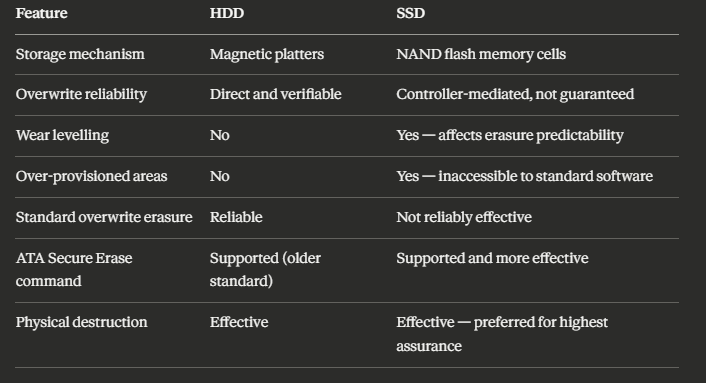
This is not a theoretical concern. Research has demonstrated that data can be recovered from SSDs that have been subjected to standard overwrite erasure, precisely because of the wear-levelling and over-provisioning factors described above. The recovery rate varies by drive, controller, and the erasure method attempted — but the possibility is real enough to require a different approach.
📌 Related read: IT Recycling and GDPR Compliance in Scotland — the broader GDPR compliance framework for IT disposal, including what your destruction certificates need to contain.
The Three Methods That Actually Work for SSD Data Destruction
Method 1: ATA Secure Erase
ATA Secure Erase is a command built into the drive's own firmware — part of the ATA standard for storage devices. When executed correctly, it instructs the drive's internal controller to erase all cells, including the over-provisioned areas that standard software cannot reach. Because the erasure is handled by the drive itself rather than by an external software tool attempting to overwrite sectors, it is significantly more reliable on SSDs.
Modern SSD firmware implementations of Secure Erase work by resetting all NAND cells to their factory state — essentially telling every cell in the drive that it contains no data. This is more thorough than overwriting because it operates at the cell level rather than the sector level, and it includes storage areas that are invisible to the operating system.
Limitations to know: ATA Secure Erase requires the drive to be in an unlocked state to execute — some drives become locked if the command is interrupted or the system powers off during the process. Execution time varies between drives; a consumer SSD may complete in seconds while a high-capacity enterprise drive may take considerably longer. And critically: the quality of the firmware implementation varies between manufacturers. Some older or lower-quality drives implement Secure Erase incompletely.
A certified data destruction provider using ATA Secure Erase should produce a per-drive verification report confirming that the command was successfully executed and completed, along with the drive's serial number and model. If the Secure Erase command fails or returns an error, the drive should immediately go to physical destruction.
Method 2: Cryptographic Erasure
Some modern SSDs — particularly enterprise-grade drives — support hardware-based encryption through self-encrypting drive (SED) technology. When the drive stores data, it encrypts it automatically using an internal encryption key. When cryptographic erasure is performed, that key is destroyed. Without the key, the data on the drive is permanently inaccessible — rendered cryptographically unreadable even if the physical cells still contain the encrypted content.
This is extremely effective when implemented correctly. The remaining data on the drive is meaningless ciphertext without the key. Cryptographic erasure is fast — the key destruction takes milliseconds — and it can be applied across all storage areas including over-provisioned regions, because the encryption covers the entire drive.
Limitations to know: Not all SSDs support hardware-based encryption. Cryptographic erasure only works if the drive has been encrypting data throughout its operational life. If a self-encrypting drive was used without encryption enabled — which can happen if the operating system or application bypasses the hardware encryption — cryptographic erasure does not destroy anything meaningful.
Verification of cryptographic erasure is also less straightforward than verification of Secure Erase. A provider performing cryptographic erasure should confirm the drive's SED capability, that encryption was active during the drive's operational use, and that key destruction was successfully completed.
Method 3: Physical Destruction
Physical destruction — industrial shredding that reduces the SSD to fragments too small for data recovery — is the most absolute method available. It eliminates every uncertainty introduced by the technical complexities above. There is no controller to work around, no over-provisioned area to miss, no firmware implementation quality to worry about. The storage medium no longer exists.
Physical destruction is particularly appropriate for: SSDs that cannot be verified as successfully erased through software methods, older SSDs with unknown firmware quality, drives that were used to store highly sensitive data where absolute assurance is required, drives that have failed or are physically damaged, and situations where on-site destruction is specified for chain-of-custody reasons.
The output of physical SSD destruction is a mix of materials — silicon, metals, and plastics — that enters the standard material recovery stream. A certificate confirming destruction should identify each drive by serial number, the destruction method, and the date.
📌 Related read: How IT Recycling Works Step by Step — including how physical destruction fits into the full collection and processing workflow.
Why Standard Erasure Software Reports Can Be Misleading
This is the part that makes some people uncomfortable, because it means that documentation they have collected in good faith may not reflect what actually happened.
Standard overwrite-based erasure software — the kind that works correctly on HDDs — produces a verification report by checking whether the data it attempted to write is readable at the locations it targeted. On an SSD, the controller may report that the write was successful (because it did write something to the drive's logical address space) even though the physical location of the original data was not overwritten.
The software is not malfunctioning. It is working exactly as designed — for a technology it was not designed for.
A report from standard erasure software on an SSD can confirm: that the software ran, that a write operation was performed to the drive's logical address space, and that the verification read returned the expected value. It cannot confirm: that all physical NAND cells containing the original data were overwritten, that over-provisioned areas were addressed, or that the wear-levelling controller did not redirect writes to different physical locations.
For GDPR purposes, this matters. The ICO's expectation is that you can demonstrate the data was destroyed — not that you can demonstrate a tool ran on the device. A certificate from standard erasure software applied to an SSD does not fully satisfy that standard because the technical basis of the verification is incomplete.
This is not a comfortable message for businesses that have been using this approach for years. But understanding it is the first step to addressing it.
The S-S-D Verification Framework: What to Ask Your Provider
When a data destruction provider processes SSDs — whether yours or a client's — there are three specific questions that determine whether the process is actually reliable. I call these the S-S-D Verification Framework.
S — Standard Applied
What specific erasure standard or method was used on the SSD? The answer should be one of: ATA Secure Erase (with confirmation that the command was successfully executed and verified), cryptographic erasure (with confirmation of SED capability and key destruction), or physical destruction. If the answer is a generic "professional overwrite tool" without specifying how SSD-specific limitations were addressed, that is a gap worth probing.
S — Serial-Number-Specific Certificate
Every SSD processed should be identifiable in the certificate by its serial number. A batch certificate covering a quantity of SSDs without individual identification does not allow you to confirm that a specific drive was processed — and it does not allow you to demonstrate to the ICO that the device holding a specific individual's data was destroyed.
This is the same requirement that applies to HDDs — but it is worth emphasising for SSDs because the added technical complexity makes some providers produce less detailed documentation for solid-state storage.
D — Documented Fallback for Failed Erasure
What happens when ATA Secure Erase fails or returns an error? A reliable provider will have a documented protocol for this: the drive goes immediately to physical destruction, and the certificate reflects physical destruction as the method for that specific device.
If a provider cannot describe this fallback clearly, or if their certificates do not distinguish between software-erased and physically destroyed drives, that is a significant process gap.
📌 Related read: Small Business IT Recycling Guide — the broader practical guide covering provider selection, documentation, and the complete disposal process.
What Types of Business Equipment Contain SSDs
This matters because the scope of the SSD data destruction question is broader than most people assume. It is not just modern laptops. It includes:
Laptops manufactured from approximately 2015 onwards. Most business-grade laptops sold in the past decade include SSDs as standard. Older devices may have hybrid drives (a small SSD cache combined with an HDD) which require attention to both components.
Desktop computers, particularly compact or enterprise models. Many modern desktop PCs use M.2 SSDs or SATA SSDs, either as the primary drive or alongside a secondary HDD.
Servers, particularly newer generations. Enterprise SSD deployment in server environments has grown significantly. High-capacity NVMe SSDs are now common in server configurations that previously used HDD arrays.
Networking equipment with embedded storage. Some routers, switches, and unified communications appliances use embedded solid-state storage for firmware, configuration, and log data.
Mobile phones and tablets. All modern smartphones and tablets use NAND flash storage — the same underlying technology as SSDs. The technical complexities of wear levelling and over-provisioning apply here too, which is why certified mobile erasure software matters.
USB drives and flash memory cards. These use NAND flash in the same category as SSDs. Physical destruction is typically the most practical and reliable option for these devices given the difficulty of applying ATA Secure Erase to removable media.
A Practical Scenario: What This Looks Like in a Real Business Disposal
Here is a realistic scenario that illustrates why the SSD distinction matters in practice.
A professional services firm is disposing of forty laptops from their last upgrade cycle. The devices are three to five years old — all running SSDs as the primary storage. They engage a data destruction provider, agree a collection, and receive certificates three days later.
The certificates confirm that each device was processed. The provider used their standard erasure tool. Serial numbers are listed. Everything looks correct.
What the firm does not know — and has no way to verify from the certificate — is whether the erasure tool used was SSD-aware. Whether ATA Secure Erase was executed on each drive or whether standard overwrite was applied. Whether failed erasure attempts were escalated to physical destruction or simply logged as completed.
Six months later, a redundant employee claims that personal data was included in documents they stored on their work laptop. The firm cannot demonstrate, to the level of technical certainty that the ICO might require in an investigation, that the data was irreversibly destroyed — only that a certificate was produced.
The gap is not in the documentation. It is in the technical process behind it.
The solution is not to assume a provider is doing this correctly. It is to ask the S-S-D Verification Framework questions before you engage them — and to specify in writing that SSD-appropriate erasure methods are required.
📌 Related read: IT Recycling for Scotland Businesses — how Scottish businesses are working with certified providers and what to look for in a provider who handles mixed equipment including SSD-based devices.
When Physical Destruction Is the Right Default for SSDs
Given the technical complexities above, some compliance teams take a simpler position: physical destruction for all SSDs, no exceptions. This avoids every uncertainty about firmware quality, wear-levelling interference, over-provisioning, and cryptographic erasure eligibility.
It is a defensible position — particularly for organisations handling sensitive data at scale — but it is not the only valid approach. Physical destruction is more expensive than software-based erasure, and for high volumes of relatively modern SSDs where ATA Secure Erase can be reliably executed and verified, software-based methods with robust documentation are appropriate.
A risk-based approach looks like this:
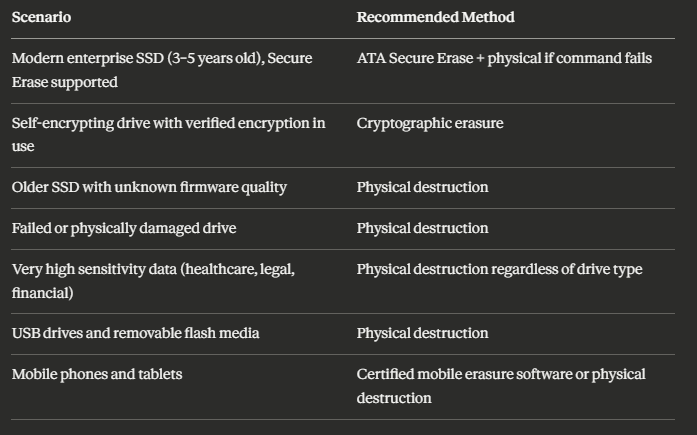
Whatever approach your provider uses, the documentation should reflect the specific method applied to each device — not a single certificate covering a mixed batch with a single method listed.
📌 Related read: IT Recycling vs IT Disposal in Scotland — why the choice of provider and process has as much impact on compliance as the decision to recycle.
Key Takeaways
SSDs require data destruction — GDPR applies to solid-state storage in exactly the same way it applies to hard drives
Standard overwrite-based erasure is not reliably effective on SSDs due to wear levelling and over-provisioned storage areas that the software cannot reach
The three methods that actually work are ATA Secure Erase (executed by the drive's own firmware), cryptographic erasure (for self-encrypting drives with verified encryption), and physical destruction
Standard erasure certificates applied to SSDs can be technically misleading — they confirm a tool ran on the device, not that all physical data locations were addressed
The S-S-D Verification Framework covers the three questions to ask any provider: Standard applied, Serial-number-specific certificate, and Documented fallback for failed erasure
Solid-state storage is not just in laptops — servers, networking equipment, mobile devices, USB drives, and some enterprise appliances all contain NAND flash requiring the same attention
Physical destruction is the most absolute method and the right default for high-sensitivity data, failed drives, older SSDs with unknown firmware quality, and removable media
Certificates must identify each SSD by serial number and specify the method used — batch certificates without serial numbers do not provide adequate GDPR compliance documentation
When selecting a provider, ask specifically whether their erasure process is SSD-aware and what happens when ATA Secure Erase fails on a specific device
The gap between an adequate certificate and adequate compliance is technical — understanding it is the first step to closing it
Frequently Asked Questions
1. Can you wipe an SSD the same way as a hard drive? Not reliably. Standard overwrite-based erasure — which works predictably on HDDs — is not consistently effective on SSDs because the drive's internal controller manages write operations and may not overwrite the physical locations containing the original data. Reliable SSD erasure requires either ATA Secure Erase (executed by the drive's firmware), cryptographic erasure (for self-encrypting drives), or physical destruction.
2. Does encrypting an SSD before disposal count as data destruction? It depends on the implementation. If the drive is a self-encrypting drive (SED) that was encrypting data throughout its operational life, destroying the encryption key — cryptographic erasure — renders the remaining data permanently inaccessible and is an accepted destruction method. If the drive was not encrypting data during use, encrypting it at the point of disposal does not destroy existing data and does not satisfy GDPR requirements.
3. What is ATA Secure Erase and is it reliable? ATA Secure Erase is a command built into SSD firmware that instructs the drive's internal controller to reset all storage cells to their factory state — including over-provisioned areas that standard erasure software cannot reach. When correctly implemented and successfully executed, it is significantly more reliable than overwrite-based erasure for SSDs. Its reliability depends on the quality of the firmware implementation, which varies between manufacturers and drive models.
4. Should I just physically destroy all SSDs to be safe? Physical destruction is the most absolute method and eliminates all technical uncertainty. It is the right default for high-sensitivity data, failed or damaged drives, older SSDs with unknown firmware quality, and removable flash media. For modern enterprise SSDs where ATA Secure Erase can be reliably executed and verified, software-based methods with per-device certificates are appropriate. A risk-based approach — rather than a blanket policy either way — is typically most practical for business IT disposal at scale.
5. How do I know if my disposal provider is handling SSDs correctly? Ask three specific questions: what method do they use for SSDs specifically (ATA Secure Erase, cryptographic erasure, or physical destruction); do they produce per-device certificates with serial numbers; and what happens when ATA Secure Erase fails on a specific drive. A provider who cannot clearly answer all three — or who confirms they use the same overwrite tool for SSDs as for HDDs — is not handling solid-state storage to the standard required for robust GDPR compliance.
If you are not certain your current data destruction process handles SSDs correctly — whether that means reviewing your provider's documentation, updating your disposal policy, or booking a collection with a provider who specifically addresses solid-state storage — the right time to act is before the next batch of equipment leaves your building.
The technical gap in SSD erasure is not widely understood. The compliance exposure it creates is real. And closing it is straightforward once you know what to ask.