Small Business IT Recycling Guide: What to Do with Old IT Equipment
“IT recycling for small businesses is the process of securely disposing of old computers, laptops, servers, and electronic equipment in a way that is legally compliant, environmentally responsible, and data-safe. Under UK law, businesses must follow WEEE regulations when disposing of electronic waste and ensure all data is properly destroyed before equipment leaves the premises.”
I was auditing the digital presence of an IT recycling company in Scotland — going through their service pages, mapping their content gaps, and thinking about the kinds of clients they serve. What struck me most was not the technical SEO issues. It was the user behaviour pattern sitting underneath all of it.
Small business owners were searching for things like "how to get rid of old computers" and "is it illegal to throw away hard drives" — basic questions that suggested they genuinely did not know what the rules were. And the rules, it turns out, matter enormously.
Disposing of business IT equipment without following the correct process is not just environmentally careless. It can expose your business to data protection liability under GDPR, regulatory penalties under WEEE legislation, and reputational damage that is very difficult to recover from.
This guide covers everything a small business needs to know about recycling IT equipment correctly. What the law says, what happens to your data, how the collection process actually works, and what documentation you need to protect yourself.
If you have got a cupboard full of old laptops, a server you decommissioned two years ago, or a pile of mobile phones that have not been touched since the last upgrade cycle — this is for you.
Who This Guide Is For (And Who It Is Not)
This is for you if:
You run a small or medium-sized business in Scotland or the UK
You have old IT equipment — laptops, desktops, servers, phones, tablets, networking gear — that you need to dispose of responsibly
You are unsure whether your current disposal process is legally compliant
You want to understand what happens to your data before equipment leaves your building
This is not for you if:
You are a household user (consumer WEEE rules differ slightly from business rules)
You are looking for a DIY solution to wipe your own drives at home
You are already working with a certified WEEE recycler and understand the compliance requirements
What the Law Actually Says (Without the Jargon)
Let me make this simple, because most explanations of WEEE regulations read like legal documents that nobody has the patience for.
WEEE stands for Waste Electrical and Electronic Equipment. Under UK WEEE regulations, businesses are legally required to ensure that electronic equipment is disposed of through authorised channels — not thrown in general waste, not donated to a skip, and not sent to an unauthorised third party.
Here is what that means in practice:
You cannot put old computers in your office bins
You cannot hand equipment to a man with a van who offers to take it away for free
You must use an authorised treatment facility (AATF) or a licensed waste carrier
You must receive documentation confirming that the equipment was handled correctly
The documentation piece is important and often overlooked. A legitimate IT recycling provider will issue you with a duty of care note, a waste transfer note, and in most cases a recycling certificate confirming your equipment was processed correctly. These documents are your legal protection if your disposal process is ever questioned.
The data protection angle is separate but equally serious.
Under GDPR, your business is responsible for the personal data it holds — including data stored on devices you are disposing of. Simply deleting files is not sufficient. A factory reset is not sufficient. Even formatting a hard drive does not guarantee that data cannot be recovered.
Proper data destruction means either certified software-based erasure (which overwrites data to a recognised standard) or physical destruction — shredding the drive so recovery is physically impossible. Either method should come with a certificate of destruction that identifies the asset by serial number.
📌 Related read: IT Recycling and GDPR Compliance in Scotland — the full breakdown of your data protection obligations when disposing of business equipment.
The Four Equipment Categories Small Businesses Most Commonly Mishandle
Based on the kinds of services IT recycling providers cover, and the audit work I do across business websites in this space, these are the four equipment types where small businesses most consistently get the disposal process wrong.
1. Laptops and Desktop Computers
These are the most common. Most small businesses rotate laptops every three to five years and end up with a stockpile of old machines that nobody quite knows what to do with.
The risk here is significant. Business laptops almost always contain: employee personal data, client records, financial documents, login credentials cached in browsers, and email archives. Even if the previous user "cleared everything off" before handing the device over, the data is almost certainly still recoverable without certified erasure.
What to do: Use a certified recycler who provides either drive wiping to a recognised standard (such as NCSC-approved methods) or physical drive destruction, backed by a certificate that identifies each device by serial number.
2. Servers and Network Equipment
These are less frequent but far higher risk. A decommissioned server in a server room or a retired NAS device can hold years of business data — customer databases, financial records, project files, backup archives. Network equipment like routers and switches can hold configuration data, VPN credentials, and network topology information.
I have reviewed service pages for IT recycling providers who explicitly cover data centre and server room decommissioning — and the scope of what needs to happen is considerably more involved than simply switching a device off and handing it over. Proper decommissioning includes: creating an asset inventory before collection, applying chain-of-custody protocols during transport, and providing a full destruction report with serial numbers confirmed.
What to do: Do not treat servers like laptops. Use a provider that specifically covers data centre decommissioning and can document every device from collection to destruction.
📌 Related read: How IT Recycling Works Step by Step — the full process explained from collection through to certification.
3. Mobile Phones and Tablets
These are the most likely to be handled casually — handed to employees to "sort out", donated to charity without data wiping, or left in a drawer indefinitely. The problem is that mobile devices carry an enormous amount of sensitive information: email accounts, messaging apps, authentication apps, contacts, calendar entries, and in many cases, access credentials for cloud systems.
A factory reset on a mobile device is not data destruction. Research has consistently shown that data can be recovered from factory-reset Android and iOS devices using commercially available tools. Proper disposal means either certified erasure using specialist mobile device management software or physical destruction.
What to do: Treat mobile phones with the same seriousness as laptops. Use a recycler who explicitly covers mobile and tablet recycling with data erasure certification, not just a general waste handler.
4. Networking and Telecoms Equipment
PBX systems, switches, routers, and telecoms hardware are frequently overlooked in disposal processes — partly because they do not obviously contain "data" in the way a laptop does, and partly because businesses often do not know what to do with them.
In reality, network hardware can contain: stored credentials, VLAN configurations, VPN tunnels, and access control lists. Telecoms equipment like PBX systems holds call routing logic, extension configurations, and in some cases call logs. The configuration data on this equipment can be a security exposure if it falls into the wrong hands.
What to do: Use a recycler that specifically covers telecoms and network equipment recycling, understands the data handling requirements, and provides WEEE documentation for the disposal.
The S-C-A-N System: My Framework for Small Business IT Disposal
Over the course of auditing content strategies and service architectures for IT recycling businesses, I developed a simple four-step framework for how small businesses should approach the disposal process. I call it the S-C-A-N System.
It is designed to be easy to remember and to cover every stage from starting the process to receiving your compliance documentation.
S — Sort Your Equipment First
Before contacting a recycler, do an internal audit of everything that needs to go. Create a simple spreadsheet with: device type, approximate age, rough condition, and whether it contains data (almost everything does).
This helps the recycler give you an accurate quote. It also forces you to identify any devices that might need special handling — failed hard drives, physically damaged devices, anything that was used to store particularly sensitive data.
Do not assume anything is "too old to matter". Old devices often contain the most sensitive data — archived files, legacy credentials, forgotten email accounts — precisely because they have not been reviewed in years.
C — Choose a Certified Provider
Not all IT recycling providers are equal. The minimum requirement is a licensed waste carrier. The correct requirement for business IT equipment is an AATF — an Authorised Treatment Facility, licensed under WEEE regulations.
When evaluating a provider, ask for:
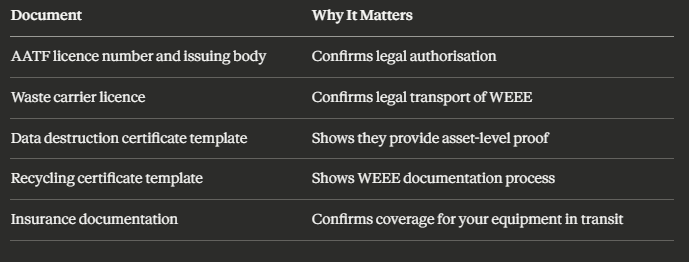
A legitimate provider will have all of these available without hesitation. If they cannot produce them, use a different provider.
A — Arrange Collection and Documentation
Contact your chosen provider and arrange a collection. For most small businesses, this means:
Agreeing a collection date and site access details
Confirming the types and quantities of equipment being collected
Asking for a pre-collection asset list template if you want to document serial numbers in advance
On the day of collection, ask for a signed consignment note or waste transfer note. This is the document that records the transfer of legal responsibility for the equipment from you to the recycler. Keep this on file.
N — Note Your Certificates
After processing, your provider should send you:
A recycling certificate confirming WEEE compliance for each category of equipment
A data destruction certificate confirming erasure or physical destruction for each data-bearing device (ideally with serial numbers)
File these documents and keep them for a minimum of three years. If you are ever audited for GDPR compliance or asked to demonstrate WEEE duty of care, these are the documents that protect you.
📌 Related read: IT Recycling Scotland for Businesses — a more detailed look at what the process looks like for UK businesses at scale.
What Actually Happens to Your Equipment After Collection
This is the part most businesses never think about — and it is worth understanding, because it affects both your compliance position and your environmental impact.
A well-run IT recycler will follow this sequence:
Step 1 — Intake and inventory. Equipment arrives at the facility. Each device is logged by asset type, serial number, and condition. This creates the audit trail that backs your documentation.
Step 2 — Data destruction. Every data-bearing device goes through either certified software erasure (overwriting data to a recognised standard with a verification report) or physical shredding. Some providers offer on-site destruction, which means the drive is destroyed before the equipment leaves your building — eliminating transport risk entirely.
Step 3 — Triage for reuse. Equipment in good condition may be assessed for refurbishment and redeployment. This is environmentally preferable to immediate recycling and can sometimes generate a return for the client. Equipment that cannot be refurbished goes to material recovery.
Step 4 — Material recovery. Devices that cannot be reused are broken down for component and material recovery. This includes metals, plastics, and in specialist facilities, precious metals from circuit boards and printed circuit assemblies.
Step 5 — Certification and reporting. You receive your documentation confirming the full chain of custody from collection to processing.
The entire process — done correctly — leaves no recoverable data and no WEEE in landfill. That is the standard your chosen provider should be meeting.
📌 Related read: IT Recycling vs E-Waste Disposal in Scotland — why the distinction matters and what "e-waste disposal" actually means for your compliance obligations.
The Hidden Cost of Getting This Wrong
I want to address the objection I see most often from small business owners when this topic comes up: "we are too small for anyone to notice."
This is a meaningful risk calculation error.
The ICO (Information Commissioner's Office) has the authority to investigate data protection breaches regardless of business size. A data breach caused by improper disposal of IT equipment — a recovered hard drive containing customer records, for example — can result in a formal investigation, a public reprimand, or a financial penalty. The ICO has issued penalties to businesses of all sizes, not just enterprise organisations.
WEEE enforcement is handled by the Environment Agency in England and SEPA in Scotland. Businesses found to be disposing of electronic equipment through non-compliant channels can face fixed penalty notices and, in serious cases, prosecution.
The cost of a legitimate collection and recycling service for a small business is almost always less than the legal minimum fine for a compliance failure.
That is not a scare tactic. That is an honest cost comparison.
Key Takeaways
WEEE regulations apply to all UK businesses regardless of size — throwing electronic equipment in general waste is illegal
A factory reset or file deletion does not constitute data destruction under GDPR — only certified erasure or physical destruction does
The four highest-risk equipment categories for small businesses are laptops, servers, mobile phones, and network/telecoms hardware
Use the S-C-A-N System: Sort equipment, Choose a certified AATF provider, Arrange collection and get a consignment note, Note your certificates
Your provider should give you a data destruction certificate and a recycling certificate identifying each device — keep these for a minimum of three years
Equipment in good condition may be refurbished and redeployed, which reduces environmental impact and can occasionally generate a return
The cost of compliant recycling is almost always less than the minimum penalty for a compliance failure
Collection does not have to be complicated — a certified provider handles the logistics, documentation, and processing; you just need to book it
Frequently Asked Questions
1. Is IT recycling free for small businesses? It depends on the provider and the volume and type of equipment. Some IT recycling providers offer free collection for larger quantities of standard IT equipment. Others charge based on the number of devices or the complexity of the job (for example, server room decommissioning typically involves a site survey and a bespoke quote). The important thing is that the service includes certified data destruction and WEEE documentation — not just a free van to take your equipment away.
2. Do I need to wipe hard drives before a collection? No — and in many cases you should not attempt to do this yourself unless you have certified software and can produce verification reports. A reputable IT recycler will handle data destruction as part of the service and provide you with a certificate confirming the method and verification for each device. Attempting to wipe drives yourself without certification does not satisfy your GDPR obligations.
3. What documents should I receive after IT recycling? At a minimum, you should receive: a waste transfer note or consignment note at the point of collection, a data destruction certificate (identifying each data-bearing device by serial number and confirming the method used), and a recycling certificate confirming WEEE-compliant processing. Keep all three documents on file.
4. Can I donate old business laptops to charity instead? Yes — but only if data has been properly destroyed first. Certified erasure (not a factory reset) must be completed and documented before any device leaves your control, regardless of where it is going. If you cannot certify the erasure yourself, use a recycler who can process the data destruction and then facilitate donation or refurbishment.
5. What is the difference between IT recycling and general WEEE disposal? General WEEE disposal covers all electrical waste — household appliances, tools, lighting, and so on. IT recycling is a specialist subset focused on computing, networking, data storage, and telecoms equipment. The key distinction for businesses is that IT recycling providers specifically handle data destruction, whereas general WEEE facilities typically do not. Always use a provider with explicit IT recycling capability and certified data destruction, not a general waste contractor.
If you are based in Scotland and you are not sure whether your current IT disposal process is compliant — whether that is a one-off collection of old laptops or a full server room clearance — it is worth speaking to a specialist before you arrange anything.
📌 Read next: IT Recycling vs IT Disposal in Scotland: What Is the Difference? — understanding the distinction is the first step to making the right choice for your business.
The simplest way to know whether your process is right is to speak to a certified recycler and ask the right questions. They should be able to tell you exactly what documentation you will receive, how your data will be destroyed, and what the collection process looks like from start to finish.
If they cannot answer those questions clearly — find a different provider.