GDPR and Data Destruction Explained: What UK Businesses Must Do Before Disposing of Any Device
“Data destruction under GDPR is the process of permanently and irreversibly eliminating personal data stored on digital devices so it cannot be recovered. Under UK GDPR, businesses are legally responsible for ensuring personal data is securely destroyed when equipment is disposed of. This requires either certified software-based erasure or physical destruction — both must be documented with a certificate identifying each device.”
Here is the scenario I see most often when auditing how businesses handle IT disposal.
An employee leaves. The IT team collects their laptop. Someone does a factory reset. The device goes into a pile of old equipment in a back room. Months later, it gets donated to a charity, sold on a marketplace, or handed to someone who offered to "take it away". Everyone assumes the data is gone.
It is not.
A factory reset removes the user interface to your data. It does not erase the data itself. Using commercially available recovery software — the kind that costs less than £50 and requires no technical expertise — someone can restore files, emails, browser history, cached credentials, and documents from a factory-reset device in under an hour.
That is a data breach. And under UK GDPR, the business that disposed of the device is legally responsible for it.
This guide explains exactly what GDPR requires when it comes to data destruction, what the difference is between deleting data and destroying it, what methods actually satisfy the legal standard, and what documentation your business needs to protect itself if questions are ever asked.
This is not a legal document — I am an SEO content strategist, not a solicitor. But the substance here reflects the real requirements that compliance teams, IT managers, and small business owners need to understand before disposing of any device that ever held personal data.
Who This Is For (And Who It Is Not)
This guide is for you if:
You run or work in a UK business that handles personal data (which is essentially every business)
You are responsible for IT asset disposal, decommissioning, or recycling decisions
You are unsure whether your current data deletion process satisfies GDPR requirements
You want to understand what documentation to request from a data destruction provider
This is not for you if:
You are looking for technical guidance on writing data erasure software
You need specific legal advice for an active ICO investigation (speak to a solicitor)
You are a household user disposing of personal devices (the principles are similar but the legal obligations differ)
What GDPR Actually Says About Data Disposal
UK GDPR — which retained the EU GDPR framework following Brexit, with adaptations in the UK Data Protection Act 2018 — establishes several principles that directly apply to how businesses handle data on devices they are disposing of.
The three most relevant are:
Storage limitation: Personal data must not be kept for longer than is necessary for the purpose it was collected. When a device is being disposed of, any personal data on it has reached the end of its retention period. At that point, the business has a legal obligation to ensure the data is destroyed — not just deleted.
Integrity and confidentiality: Personal data must be processed in a manner that ensures appropriate security, including protection against unauthorised access. Disposing of a device with recoverable data on it is a failure of this principle.
Accountability: Businesses must be able to demonstrate compliance with GDPR principles. This means documentation. If the ICO ever asks how you disposed of a device containing personal data, "we deleted the files" or "we did a factory reset" is not a defensible answer. A data destruction certificate with the device serial number and the method used is.
The consequences of getting this wrong are real. The ICO has the authority to issue fines of up to £17.5 million or 4% of global annual turnover (whichever is higher) for serious breaches. Even lower-tier penalties — formal reprimands, enforcement notices, or smaller fines — carry significant reputational consequences for businesses of any size.
📌 Related read: IT Recycling and GDPR Compliance in Scotland — the specific compliance framework for businesses disposing of IT equipment through recycling services.
Deletion vs Destruction: The Distinction That Most Businesses Miss
This is the core misunderstanding I encounter constantly — and it is the one that creates the most compliance risk.
Deletion means removing access to data through the operating system. When you delete a file, empty the recycle bin, or perform a factory reset, you are telling the operating system to mark that storage space as available. The actual data remains on the physical storage medium until it is overwritten by new data. Until that overwriting happens — which can take months or never happen at all — the original data is recoverable.
Destruction means permanently eliminating the data so that recovery is physically or cryptographically impossible. This requires one of two approaches: certified software erasure that overwrites the entire storage medium to a recognised standard, or physical destruction that renders the storage medium unreadable.
The table below illustrates the difference clearly:
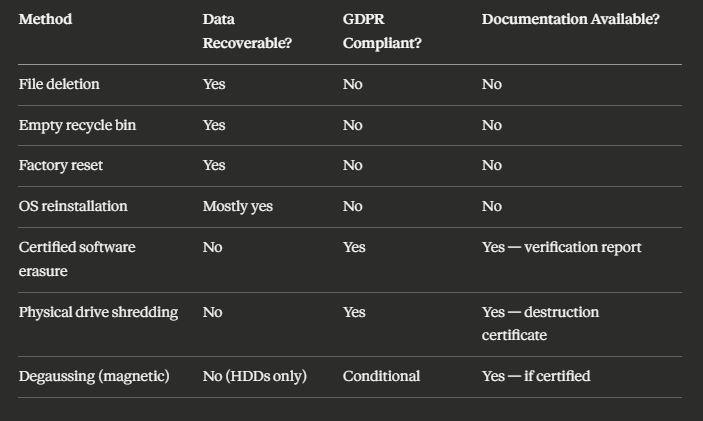
The only methods in this table that satisfy GDPR are the last three — and all of them require documentation to make the compliance defensible.
The Three Methods of Data Destruction That Actually Work
Method 1: Certified Software Erasure
Software-based data erasure works by overwriting every sector of a storage medium with random data — typically multiple passes — so that the original content cannot be distinguished from noise. The key word here is "certified". The erasure must be performed using software that produces a verification report confirming that every sector was successfully overwritten.
This method works well for: hard drives (HDDs), solid-state drives (SSDs) in most cases, laptops, desktops, servers, and mobile devices when managed through appropriate software.
What to ask for: A per-device erasure certificate that includes the device serial number, the erasure standard used (such as NCSC-approved methods or equivalents), the date of erasure, and a verification status confirming 100% completion.
Important caveat for SSDs: Standard overwrite-based erasure is less reliable on SSDs due to how solid-state storage manages data internally. Some sectors may not be overwritten correctly because the drive's controller actively manages write operations. Certified providers who handle SSDs typically use either ATA Secure Erase commands (built into the drive firmware) or physical destruction as an alternative. This is worth specifically asking about when your equipment includes SSDs.
Method 2: Physical Destruction
Physical destruction means rendering the storage medium physically unreadable — typically through shredding, crushing, or disintegration. It is the most absolute form of data destruction because there is no remaining medium from which data could theoretically be recovered.
For hard drives and SSDs, an industrial shredder reduces the storage medium to fragments small enough that reassembly is physically impossible. The output is then recycled as material (the metals and components have value in material recovery).
This method is particularly appropriate for: failed or damaged drives that cannot be erased with software, drives from systems containing highly sensitive data where absolute certainty is required, older drives where erasure verification is uncertain, and situations where a client requires witnessed or on-site destruction.
What to ask for: A physical destruction certificate identifying each drive by serial number, confirming the destruction method used, and in some cases including the weight of destroyed material.
📌 Related read:How IT Recycling Works Step by Step — including how data destruction fits into the full collection and recycling process.
Method 3: On-Site Destruction
On-site destruction is a variant of physical destruction that happens at your premises before the equipment is transported anywhere. A certified engineer brings shredding equipment to your site, destroys the drives in your presence, and issues a certificate before leaving.
This eliminates the transport risk — the concern that data could be compromised during the movement of equipment between your site and a recycling facility.
On-site destruction is most commonly used by: organisations handling particularly sensitive data (healthcare, legal, financial services, public sector), businesses with large quantities of storage media to destroy, and situations where compliance auditors or senior management need to witness the process.
It costs more than off-site destruction. For most small and medium businesses, off-site destruction with a robust chain-of-custody process is sufficient. But it is worth knowing the option exists if your risk profile demands it.
The D-O-C-S Framework: What Documentation Your Business Needs
Based on my work auditing compliance documentation requirements for IT disposal services, I use a simple framework I call the D-O-C-S System to help businesses understand what paperwork they need to collect and keep.
D — Duty of Care Note (Waste Transfer Note)
This document records the transfer of legal responsibility for your equipment from your business to the recycling or destruction provider. It is a legal requirement under waste carrier regulations. It should be signed at the point of collection.
What it confirms: the types and quantities of equipment transferred, the date of transfer, the details of the licensed waste carrier, and both parties' signatures.
Keep this document: indefinitely (or for the life of your business).
O — Operations Record (Chain of Custody)
Some providers offer a more detailed chain-of-custody record that tracks each device from collection through to processing. This is particularly valuable for high-volume or high-sensitivity jobs.
What it confirms: the movement of each asset from your premises to the recycling facility, with timestamps, transport details, and receipt confirmation.
Keep this document: minimum three years, ideally longer for high-risk equipment.
C — Certificate of Data Destruction
This is the most important document from a GDPR compliance perspective. It should identify every data-bearing device processed, by serial number, and confirm the method and standard used for destruction.
What it must include: device serial numbers, destruction method (software erasure standard or physical destruction method), date of processing, verification status for software erasure, and the name and accreditation of the provider.
Keep this document: minimum three years. If the devices held personal data, keep until you are certain any regulatory investigation window has passed.
S — Summary Recycling Certificate
This document confirms that your equipment was processed in compliance with WEEE regulations and the material recovery achieved. It is primarily an environmental compliance document rather than a data protection document — but it closes the loop on your overall disposal process.
What it confirms: the categories and weights of WEEE processed, the recycling facility's authorisation, and confirmation of compliant disposal.
Keep this document: minimum three years.
📌 Related read:Small Business IT Recycling Guide — the broader practical guide covering the full disposal process from collection to certification.
Special Cases: Devices That Get Overlooked
Most businesses think about laptops and desktops when they think about data destruction. These are the right instinct. But they miss several categories of device that carry significant data exposure risk.
Mobile phones and tablets. As I mentioned earlier — a factory reset is not data destruction for mobile devices. Specialist mobile erasure software exists that satisfies the required standard, and a certificate should be issued per device. Mobile devices often carry: email access, authentication apps (which can grant access to cloud systems), contacts, messages, and calendar data.
Network equipment. Routers, switches, firewalls, and wireless access points store configuration data including network credentials, VPN configurations, and access control lists. This data can give an attacker a detailed map of your network architecture. Always require confirmation that configuration data has been wiped from network equipment before disposal.
Photocopiers and printers. This one surprises almost everyone. Modern office photocopiers and multifunction printers contain hard drives that store copies of every document scanned, printed, or faxed through the device. These drives must be erased or physically destroyed before a device leaves your premises.
USB drives and external storage. Commonly overlooked because they are small. USB drives should be physically destroyed — software erasure is possible but impractical given the quantity most organisations accumulate. A certificate covering batches of media by weight is acceptable.
Backup tapes. Older organisations may still have LTO tapes or DAT tapes containing archived backups. Physical destruction is the appropriate method here. Degaussing (strong magnetic erasure) is an alternative if the tapes are being destroyed rather than reused.
A Real-World Scenario: What Happens When This Goes Wrong
I want to illustrate the risk with a realistic scenario rather than abstract compliance language.
Imagine a small accountancy firm. They have just upgraded twenty laptops across the team. The old ones sit in the office for three months. Eventually, the office manager gives them to a local computer recycler — not an AATF-certified provider, just someone who came up in a local search and offered free collection.
Six months later, a journalist contacts the firm. A batch of laptops matching the firm's asset descriptions were listed on an online marketplace. The drives had not been wiped. The buyer — doing a routine check on a second-hand purchase — found client tax documents, national insurance numbers, and salary data from the previous three years.
The ICO investigation that follows is not focused on whether the firm intended to cause a breach. It is focused on whether the firm had appropriate technical and organisational measures in place to prevent one. The firm cannot produce a data destruction certificate. They used an unlicensed provider. They have no duty of care documentation.
The outcome: a formal reprimand, a requirement to implement an IT disposal policy, and a fine that — while not at the maximum level — costs more than the certified recycling service would have cost across the entire lifespan of the business.
This scenario is not hypothetical. Variants of it appear in ICO investigation reports every year.
📌 Related read: IT Recycling vs IT Disposal in Scotland — why the choice of provider matters as much as the decision to recycle.
How to Choose a Data Destruction Provider That Satisfies GDPR
When evaluating a provider, ask these specific questions — and if any answer is vague or absent, that is your signal to look elsewhere.
1. Are you a licensed waste carrier? This is the minimum legal requirement for transporting electronic waste. Ask for their licence number and verify it with the Environment Agency or SEPA.
2. Are you an Authorised Treatment Facility (AATF) under WEEE regulations? For IT equipment recycling, AATF status confirms the facility is approved to process WEEE. Ask for their licence number.
3. What erasure standard do you use for software-based destruction? A credible provider will name a specific standard or framework. Generic answers like "we use professional software" are not sufficient.
4. Do you issue per-device destruction certificates with serial numbers? The answer must be yes. A batch certificate without serial numbers is not sufficient for GDPR compliance because it does not allow you to confirm that a specific device was processed.
5. What is your process for failed or damaged drives that cannot be software-erased? A legitimate provider will have a physical destruction protocol for drives that cannot be wiped. If they do not, ask what happens to those drives.
6. Can you provide a sample certificate? Reviewing a sample before engaging a provider tells you immediately whether their documentation meets the standard you need.
📌 Related read: IT Recycling for Scotland Businesses — how businesses across Scotland are handling compliant IT disposal at scale.
Key Takeaways
Under UK GDPR, businesses are legally responsible for personal data on every device they dispose of — regardless of whether the device is old, broken, or "cleared"
File deletion, emptying the recycle bin, and factory resets do not constitute data destruction — the data remains recoverable
The only GDPR-compliant methods are certified software erasure (with verification report) and physical destruction (with destruction certificate)
SSDs require special attention — standard overwrite-based erasure may not be reliable; ask your provider how they handle solid-state storage
The D-O-C-S Framework covers the four documents every business should collect: Duty of Care Note, Operations/Chain of Custody Record, Certificate of Data Destruction, Summary Recycling Certificate
Overlooked device categories include: photocopiers, network equipment, mobile phones, USB drives, and backup tapes
Using an unlicensed provider is not a defence against an ICO investigation — it is evidence of inadequate technical and organisational measures
Per-device destruction certificates with serial numbers are the minimum standard for defensible GDPR compliance
Keep all data destruction documentation for a minimum of three years — longer if the devices held particularly sensitive personal data
Frequently Asked Questions
1. Does GDPR apply to old equipment that is no longer in use? Yes. GDPR applies to personal data for as long as it exists — including data stored on devices sitting in storage rooms, server racks, or equipment awaiting disposal. The obligation to securely destroy data does not disappear because a device is no longer actively used. If anything, dormant equipment is higher risk because it is less likely to be monitored.
2. Is a factory reset sufficient for GDPR compliance? No. A factory reset removes the operating system's access to data but does not overwrite the underlying storage. Personal data remains recoverable using standard recovery software. Only certified erasure to a recognised standard, or physical destruction, satisfies the GDPR requirement for secure data disposal.
3. What happens if my business cannot produce a data destruction certificate after a breach? The absence of documentation significantly weakens your compliance position. The ICO's investigation will assess whether you had appropriate technical and organisational measures in place. Being unable to demonstrate that data was securely destroyed — through a certificate identifying the device and the method used — is treated as evidence that your measures were inadequate.
4. Do I need separate destruction certificates for every device? For GDPR purposes, yes — each data-bearing device should be identifiable in your destruction documentation. A certificate covering a batch by quantity alone does not allow you to confirm that a specific device was processed. Per-device certificates with serial numbers are the defensible standard.
5. Can I destroy data myself rather than using a provider? Technically yes, if you have appropriate certified software, can produce a verifiable report, and can document the process. In practice, most businesses do not have this capability. Using a certified provider is simpler, produces third-party documentation (which is more defensible than self-certified records), and typically includes WEEE-compliant material recovery as part of the same process.
If you are not certain your current IT disposal process would survive an ICO review — whether that is because you have no documentation, have been using unlicensed collectors, or simply have not thought about it before — the right move is to speak to a certified provider before the next batch of equipment leaves your building.
The cost of getting a certified collection, data destruction, and recycling service is a fraction of the cost of a compliance failure. More importantly, the documentation you receive is permanent proof that you did the right thing.