Best AI Tools for SaaS Founders in 2026: The Only Stack Guide You Actually Need
“The best AI tools for SaaS founders in 2026 are Cursor (building), Notion AI (operations), Intercom Fin (support), Surfer SEO (content), and Claude or ChatGPT (thinking and writing). The right stack depends on your stage: pre-revenue founders need different tools than founders at $100K MRR. Start lean and layer in tools as revenue grows.”
I've watched SaaS founders stack tools the way some people collect gym memberships — paying for everything, using almost nothing.
In 2024, that was forgivable. The tools were new, the category was chaotic, and everyone was experimenting. In 2026, doing that is just expensive.
The AI tools landscape has matured. There are clear winners per category. The choices are not difficult: they're just buried under a mountain of affiliate-driven "best of" lists that were written to rank, not to help.
This guide is different.
I'm going to tell you exactly which tools matter, at what stage of your SaaS journey, and what each one actually does for your business. No fluff. No tool made the list because someone paid for placement. Just a working stack for founders who want to build, grow, and retain users — faster than they could two years ago.
Who this guide is for:
Bootstrapped SaaS founders at pre-revenue to $1M ARR
Small founding teams (1–5 people) making tool decisions with a real budget constraint
Technical and non-technical founders building AI-native or AI-assisted products
Who this guide is NOT for:
Enterprise SaaS teams with dedicated IT and procurement
Agencies looking for client tooling
Founders looking to automate before finding product-market fit
Let's get into it.
The Problem Most Founders Have With Their AI Stack
Here's what I see constantly: a founder buys Jasper, Surfer, Ahrefs, Notion AI, Clay, Apollo, HubSpot, and Intercom — all within 90 days of launch. That's somewhere between $500 and $1,500 per month before they've made a single dollar.
Then they burn out trying to use all of them. Half the tools sit idle. The ones they do use are used at 10% of their capability.
The problem is not the tools. The problem is no framework for choosing them.
Before you buy anything, you need to answer three questions:
What stage are you at? Pre-revenue, early traction ($10K MRR), or scaling ($100K+ MRR)?
What is the bottleneck right now? Building? Acquiring users? Retaining them? Doing ops work that shouldn't be yours?
What would you do with the time you save? If you cannot answer this, the tool is not worth buying yet.
The right AI stack for 2026 is not the biggest one. It's the one that removes the bottleneck at your current stage.
The Framework I Use: The Four Phases of SaaS Growth
Before listing any tools, here is the framework I use to match tools to founder stage. I call it the BUILD → LAUNCH → GROW → RETAIN model.
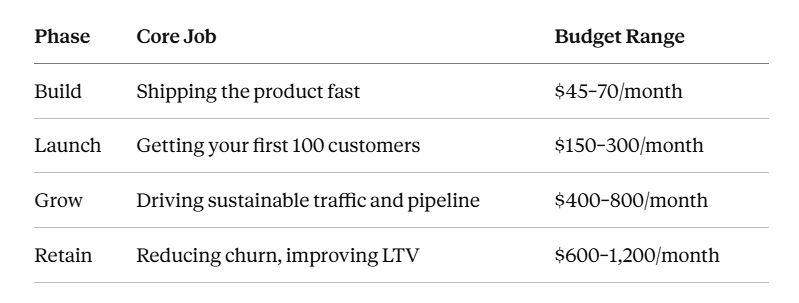
Each phase has a completely different set of tools. Most guides ignore this. They give you a flat list of 20 tools as if every founder has the same problem. They do not.
What follows is broken down by phase. Skip to where you are.
Phase 1: Build — The Tools That Help You Ship Faster
Cursor: The AI Code Editor That Changed Everything
If you are building a SaaS product right now and not using Cursor, you are working more slowly than your competitors.
Cursor is a VS Code fork with multi-model AI built directly into the editing experience. What makes it different from GitHub Copilot is that it understands your entire codebase, not just the line you're writing.
Cursor enables what some call "vibe coding" where non-technical or semi-technical founders describe features in natural language and the editor generates multi-file changes across the project.
In practice, this means: describe an API route with auth middleware, and Cursor scaffolds the handler, types, and tests in one pass. For a solo founder or a small team, this compresses weeks of development into days.
Cursor is now used by over 500,000 developers as of 2026, and it bridges both approaches by embedding multi-model AI directly into the editing experience.
Who should use it: Any technical or semi-technical SaaS founder building an MVP. If your team uses GitHub Copilot and is locked into a non-VSCode setup, Copilot Business at $19/month per seat is the pragmatic alternative. For everyone else, Cursor wins.
Pricing: Free tier for solo use. Pro at $20/month. Business at $40/month per seat.
The real advantage: The shift it creates is strategic, not just tactical. When an MVP is cheap to build, the discipline shifts entirely to deciding what to build. The fastest builders are dangerous precisely when they skip validation — they can now ship the wrong product at record speed.
So use Cursor to build fast. But make sure you've validated the idea first.
Supabase: Your Backend Without the Infrastructure Tax
Supabase gives you a Postgres database, authentication, storage, and edge functions in one open-source platform. It's the default backend for SaaS teams that want to move fast without managing infrastructure.
It is not an AI tool in the conventional sense. But in 2026, Supabase competes with Pinecone on vector search — which means it now handles the infrastructure layer for AI-native SaaS products too.
For a bootstrapped founder, Supabase on the free tier covers a surprising amount. The paid plans start at $25/month and cover almost everything a pre-Series A team needs.
When to move on: When you hit complex data architecture needs, multi-region requirements, or need compliance certifications that Supabase's tiers don't cover.
Claude and ChatGPT: Your Thinking Partners
These two belong in the Build phase not because they write code (though they do), but because they help you think.
Every SaaS founder I know uses at least one of these daily for things like: drafting product specs, writing user stories, stress-testing positioning, summarising research, and drafting outreach copy.
The Claude family is now the writing and reasoning workhorse for support, marketing, and any agent that touches structured output. Sonnet 4.6 hits a price-performance sweet spot that is pulling enterprise traffic away from GPT-4o, and Claude tool use behaviour is more reliable in long-running agent loops.
Claude is best for thoughtful writing, document reasoning, and context-heavy tasks, while ChatGPT is best for all-purpose brainstorming, writing, and logic-based tasks.
The honest answer on which to use: use both on the free tiers and pay for the one that matches how you actually work. If you do a lot of long-document analysis, lean towards Claude. If you rely on web search integration and custom GPT configurations, lean towards ChatGPT.
Phase 2: Launch — The Tools That Help You Get Your First 100 Customers
Notion AI: Your Operating System for a Lean Team
Before paying for a project management tool, a wiki, a meeting notes app, and a knowledge base — stop. Notion AI now covers all of them.
Notion AI summarises pages, generates content, extracts action items, auto-fills database properties, and answers questions across your entire workspace. The Q&A feature is the standout for ops teams — instead of searching through dozens of wiki pages or digging through Slack, you ask Notion AI a question and it pulls the answer from your knowledge base.
The part most guides miss: Notion's Custom Agents feature (launched early 2026) lets you build automated, multi-step workflows that pull data from any database.
At launch, Notion supports Claude Code, Cursor, Codex, and Decagon as partner agents, and teams can connect their own internal agents via an External Agent API.
For a SaaS founder, this means your internal wiki can now run like an intelligent system — answering questions, updating docs, and triggering actions — without a dedicated ops person.
Pricing: Free personal plan. Plus at $12/user/month. Business at $20/user/month with full AI included.
Honest limitation: Notion AI performs best on clean, structured data. If your workspace is messy, the AI produces messy output. Organise your databases properly before expecting the agent features to work.
Perplexity AI: Research Without the Rabbit Hole
This one is underrated.
Perplexity is an AI-powered search engine that synthesises answers from live web sources. For a founder in the launch phase, the main use cases are: competitor research, market sizing, finding data for investor decks, and staying current on your category.
The difference between using Perplexity and doing regular Google research is time. A task that takes 45 minutes of tab-hopping and reading takes 5 minutes in Perplexity.
The free tier is genuinely useful. The Pro version ($20/month) adds more advanced models and higher usage limits, which becomes worth it once you're doing competitive analysis daily.
Clay: The GTM Tool That Replaced Five Others
If you are doing outbound sales, lead enrichment, or building a prospect list, Clay has likely become the most important tool in your go-to-market stack.
Clay pulls data from 75+ enrichment providers, combines them, and lets you write AI-powered personalised outreach at scale — without a dedicated sales team.
The practical workflow: pull a list of ICPs, enrich them with LinkedIn, website data, and intent signals, then use the built-in AI to write personalised first lines at scale. What used to require an SDR and a week of manual work now takes an afternoon.
Pricing: Starts at $149/month. This is not cheap, but for a SaaS founder doing outbound, one closed deal typically covers months of the subscription.
Important caveat: Clay is a force multiplier on a good ICP and good messaging. If you do not know who you are selling to, Clay will help you reach the wrong people faster. Get the fundamentals right first.
Phase 3: Grow — The Tools That Build Sustainable Traffic
Surfer SEO: The Fastest Path to On-Page SEO That Actually Ranks
Every SaaS company eventually decides that organic traffic is important. Most make the mistake of writing content without knowing whether it will rank.
Surfer SEO closes that gap.
Surfer's Content Score gives you immediate feedback on how well your content matches top-ranking pages for your target keyword. As you write, the score updates in real-time — add a relevant term, the score goes up; write a thin paragraph, it drops. The SERP Analyser is exceptionally thorough. It doesn't just show keyword density — it reveals content structure, heading hierarchy, image usage, and word count patterns across the top 50 results.
For a SaaS founder building a content strategy, this matters because you are not trying to write the most content — you are trying to write the content most likely to rank.
For SaaS companies, the keyword clustering feature is particularly valuable — it takes the guesswork out of SEO optimisation by analysing top-ranking pages for your target keywords and providing specific, actionable recommendations.
Pricing: Essential plan at $89/month includes 30 articles. Scale plan at $129/month for 100 articles.
Who this is for: SaaS founders who have identified content-led growth as their primary acquisition channel and are producing at least 4–6 pieces per month. Below that volume, the cost-benefit math gets harder.
Semrush: When You Need Competitive Intelligence, Not Just Keyword Data
Ahrefs versus Semrush is a debate that has been running for five years. The honest answer in 2026 is that Semrush has pulled ahead for SaaS teams specifically, because of one addition.
In 2025, Semrush added the AI Visibility Toolkit to track visibility in ChatGPT, Perplexity, Gemini, and Claude — a $99/month add-on per domain. Semrush also includes ContentShake AI for content creation, meaning you may not need additional tools.
For a SaaS founder who cares about being found in AI-generated answers (which, if you are reading this in 2026, you should), this is a significant addition. Traditional SEO tells you whether you rank on Google. The AI Visibility Toolkit tells you whether you appear when someone asks ChatGPT which tool to use in your category.
That second signal is increasingly where B2B SaaS buying decisions start.
AI answer engines like ChatGPT and Perplexity are where 40% of SaaS buyers now begin their research.
If you are not visible there, you are missing a large and growing part of your addressable audience.
Pricing: Plans start from $139.95/month. The AI Visibility Toolkit is an add-on at $99/month per domain.
Google Search Console: The Free Tool Most Founders Underuse
This one is not AI-powered. But it needs to be on this list because it is the only tool that gives you real Google data — and most SaaS founders check it quarterly instead of weekly.
Google Search Console lets SaaS teams track which queries bring impressions but not clicks — a direct signal for where content needs improving. It also surfaces index coverage errors, Core Web Vitals failures, and manual actions before they become traffic drops. Most SaaS teams underuse it. Those that check it weekly catch problems before finance notices the dip.
Set up a weekly 30-minute review. Look at: impressions without clicks (CTR optimisation opportunities), pages losing positions (content decay), and crawl errors (technical issues). That 30 minutes per week is worth more than most paid tools.
Phase 4: Retain — The Tools That Protect Your Revenue
Intercom (with Fin AI): The Support Platform That Scales Without Headcount
Customer support is where most SaaS companies bleed both money and retention. Support at scale means either hiring a large team or automating well. In 2026, Intercom's Fin AI makes the automation path genuinely viable.
Intercom's Fin can read your help centre, documentation, and previous chat history to answer user questions instantly in natural, human-like language. It's particularly powerful for onboarding and retention — by guiding users through in-app experiences, Fin reduces friction during setup and increases adoption rates.
Intercom does a great job of blending automation with live agent handoff. You can configure Fin to handle only certain topics, pass tickets to specific teams, or loop in a rep after three messages. It integrates with Salesforce, HubSpot, and Slack, which means support doesn't live in a silo — you can auto-update CRM fields, trigger follow-ups, or send alerts when customers hit friction points without needing another tool.
Pricing: Fin AI charges roughly $0.99 per resolved conversation. This pricing model aligns cost with value — you only pay when the AI actually resolves something. For teams with high ticket volumes and simple support queries, this is significantly cheaper than headcount.
Honest limitation: Fin is only as good as your documentation. If your help centre is thin or outdated, Fin will give poor answers. Invest in your knowledge base first.
Amplitude: Product Analytics That Predict Churn Before It Happens
Most SaaS founders track sign-ups and MRR. Fewer track the product behaviour signals that predict whether users will stay or leave.
Amplitude fills that gap.
Amplitude's models analyse user behaviour, detect friction points, and predict churn long before it happens. Product managers can visualise user journeys, test hypotheses, and measure retention improvements all in one place. Amplitude doesn't just report what users do — it explains why they do it.
For a SaaS founder in the retain phase, the most important questions are: where do users drop off? What behaviour predicts long-term retention? What does a churned user look like 30 days before they cancel?
Amplitude answers all three.
Pricing: Free tier up to 10 million events/month. Growth tier starts at $995/month — this is a scaling-stage tool, not an early-stage one.
Zapier: The Automation Layer That Connects Everything
Zapier is not glamorous. It does not have a great brand story. But it is the connective tissue that makes every other tool in this stack work together.
When a lead fills a form, Zapier can add them to your CRM, notify sales in Slack, and trigger a welcome email. When an invoice is paid in Stripe, it updates your spreadsheet, sends a confirmation, and logs the transaction. Its AI features now let you describe automations in plain language and Zapier builds them for you. The newer Agents feature creates AI assistants that can take multi-step actions across your tool stack.
For a small SaaS team, Zapier eliminates the category of work that is too repetitive to do manually but too irregular to justify hiring for. That's a surprisingly large category.
Pricing: Free tier covers basic automations. Starter at $29.99/month. Professional at $73.50/month for advanced workflows.
The Stack Mapped to Stage: A Clear Summary
Here is the practical answer for where to start, based on your current stage:
Pre-revenue / MVP stage ($45–70/month):
Cursor (build)
Claude or ChatGPT free tier (thinking)
Notion AI free tier (operations)
Google Search Console (free)
Early traction — $10K MRR ($250–400/month):
Everything above, now paid
Perplexity Pro (research)
Surfer SEO Essential (content)
Clay Starter (outbound, if relevant)
Intercom Starter with Fin AI (support)
Scaling — $100K+ MRR ($800–1,500/month):
Full Semrush stack with AI Visibility Toolkit
Amplitude Growth (product analytics)
Zapier Professional (automation)
Intercom Growth (support + onboarding)
Clay Pro (GTM at scale)
The Tool Category Most Guides Ignore: Customer Discovery
This is the section that almost every "best AI tools for founders" guide skips. And it's the most important one.
CB Insights found that 35–42% of startups that shut down cite "no market need" as a top reason, making customer-evidence tooling the most underrated line in a founder's stack. Most guides over-index on productivity tools like Notion AI and Zapier and under-index on the validation work that decides whether a startup survives.
Tools like Perspective AI run AI-moderated customer interviews at scale — surfacing the "why" behind user behaviour in hours instead of weeks. For a pre-revenue or early-stage founder, this is arguably the highest-leverage tool in the entire stack.
The problem is that it does not feel urgent. Building the product feels urgent. Writing content feels urgent. Running ads feels urgent.
Talking to customers? Founders find reasons to delay it.
Do not delay it. Run customer interviews before you build the next feature. Before you write the next content piece. Before you run the next ad. The tools that help you understand your customer are worth more than the tools that help you move faster in the wrong direction.
The Unique Insight Most Founders Miss About AI Tools in 2026
Here is something that most of these comparison guides do not say clearly:
The consolidation trend is real, and it favours founders who move early.
The pattern that emerges across the best SaaS stacks in 2026 is unification rather than specialisation. Stripe is now a tax engine and an identity provider. Vercel ships an AI gateway. Cloudflare runs inference. Supabase competes with Pinecone on vector search, and Notion is a wiki, a database, an internal-tool builder, and an AI assistant. The teams that win in 2026 are the ones who pick three or four anchor vendors and let them absorb adjacent jobs, instead of stitching together fifteen point solutions.
The practical implication: every additional tool you add to your stack has a hidden cost that does not appear on the pricing page. It's the cognitive cost of context-switching, the integration cost, the maintenance cost when APIs change, and the training cost when a new team member joins.
Pick anchor vendors. Pay for depth, not breadth.
The SaaS founders I've seen scale efficiently are not the ones with the most tools. They're the ones who chose three tools early, learned them deeply, and extracted full value before adding anything else.
AI Visibility: The Dimension of Your Stack You Probably Haven't Thought About
One more thing that deserves its own section.
In 2026, being visible in Google is not enough. Your buyers are asking ChatGPT, Perplexity, and Claude which tools to use. If your product does not appear in those answers, you are invisible to a large and growing segment of your market.
Superlines' 2026 AI search data found that citation rates for the same brand can differ by up to 615x between platforms for the same queries. A brand with strong Google AI Overviews visibility can have near-zero presence in Perplexity responses for the identical query.
Onely research shows listicles achieve a 25% citation rate in AI Overviews versus 11% for blogs and opinion pieces. According to Exposure Ninja and Malte Landwehr of Peec AI, being cited as a source by large language models can increase brand mentions by up to 11x for B2B SaaS companies.
What does this mean for a SaaS founder building their stack?
It means you should be tracking AI visibility alongside traditional SEO metrics. Tools like Semrush's AI Visibility Toolkit and Profound exist specifically for this. Start tracking it. Know whether your product appears when someone asks "what is the best tool for X" in ChatGPT or Perplexity.
If it does not appear, that is a content problem. And it is a solvable one — but you need to know it exists before you can fix it.
The Mistakes I See Founders Make With Their AI Stack
After watching dozens of SaaS teams build their stacks over the past 18 months, here are the consistent mistakes:
1. Buying growth tools before finding product-market fit. Clay, Surfer, and Semrush are powerful. They are also capable of helping you scale the wrong product faster. The first tool every founder should invest in is customer research — not distribution.
2. Paying for the full-tier subscription on day one. Almost every tool on this list has a free or low-cost entry point. Use it. Pay up when you hit the limits, not before.
3. Treating the stack as fixed. The AI landscape is evolving faster than almost any other software category. Tools ship major updates monthly, pricing structures change, and new entrants appear regularly. Audit your tools every 90 days. Ask: is this tool still saving me time? Has something better launched?
4. Using AI tools as a substitute for thinking. Claude and ChatGPT are tools that amplify your thinking. If your thinking is unclear, they produce clearer-sounding confusion. The output quality is directly proportional to the quality of what you put in. Founders who get the most out of AI tools are the ones who know exactly what they want before they start the conversation.
5. Optimising for impressions instead of outcomes. BrightEdge data shows search impressions jumped 49% year-over-year while click-through rates dropped 30%. A marketing team tracking impressions alone would see positive trends while actual website traffic declines.
Watch the metrics that matter: trials started, demos booked, revenue. Not impressions, followers, or content published.
The 80/20 Version: If You Could Only Pick Five Tools
If you are a bootstrapped founder and need to pick five tools right now, here is what I would choose:
Cursor — to ship faster
Notion AI (Business plan) — to run your team like a system
Claude or ChatGPT Pro — to think better and write faster
Google Search Console (free) — to track what's working without spending anything
Intercom with Fin AI — to handle support without hiring for it
That stack covers building, operations, thinking, content visibility, and customer support. It runs at roughly $150–200/month at the early-traction stage.
Add Surfer SEO when content becomes your primary growth lever. Add Semrush when you need competitive intelligence at scale. Add Clay when you start doing outbound. Add Amplitude when product analytics becomes a retention priority.
Do not add all of them at once.
FAQs: What Founders Actually Ask About AI Tools in 2026
1. What is the best AI tool for a non-technical SaaS founder?
Notion AI for operations and Claude or ChatGPT for thinking. If you are trying to build a product without coding, Cursor combined with Supabase is now achievable for founders with basic technical understanding. Full no-code SaaS building is possible for simple products, but you will quickly hit limits with anything complex.
2. Do I need both Claude and ChatGPT?
Not necessarily. Try both on the free tier and pay for one. Claude performs better on long documents, structured reasoning, and complex instructions. ChatGPT is stronger on web search integration and has a larger library of custom GPTs. Most founders end up preferring one and using the other occasionally.
3. How much should a SaaS founder spend on their AI stack at early stage?
At pre-revenue, under $100/month — relying heavily on free tiers. At $10K MRR, $250–400/month is reasonable. At $100K+ MRR, $800–1,500/month is within normal operating range for a lean team.
4. Is Surfer SEO worth it for a founder doing content themselves?
Yes, if you are publishing consistently (at least 4 pieces per month) and targeting keywords where competition is meaningful. If you are writing one blog a month with no keyword strategy, Surfer will not save your content performance; you need a strategy before you need an optimisation tool.
5. What AI tools help most with reducing SaaS churn?
Intercom with Fin AI for support resolution and user onboarding. Amplitude for identifying which product behaviours predict churn. Zapier for automating the interventions (re-engagement emails, check-in triggers, escalation to a CSM). These three together form a basic retention infrastructure.
Summary: What to Take Away From This
Stage matching is everything. The best tool for a pre-revenue founder is useless to a $500K ARR team, and vice versa.
Anchor vendors win. Pick three or four core tools and go deep rather than buying 15 and using none properly.
AI visibility is now a requirement. Being found on Google is not enough. Being cited in AI-generated answers is where B2B SaaS discovery increasingly starts.
Customer research is the most underrated tool category. Do it before you buy anything else.
Audit quarterly. This landscape changes fast. A tool that was best-in-class in Q1 may have been overtaken by Q3.
The goal of your AI stack is not to look impressive on a "tools we use" slide. It is to give you leverage — so a small team can do the work of a much larger one, without burning out.
Build that stack deliberately, and it compounds over time. Buy randomly, and you will spend more time managing tools than using them.
Next step: If you are still deciding where to start, run a simple exercise before buying anything. Write down your single biggest time constraint this week. Find one tool that removes it. Start there.